


A labor estimate and a project duration are related, but they are not the same number. Twenty person-hours can mean twenty hours for one person, ten working hours for two people, or a longer elapsed programme when the work crosses nights, weekends or a required drying period. Treating all three as “two and a half days” is how plausible estimates become unreliable schedules.
This guide shows you how to turn measured work and observed productivity into person-hours, build a realistic crew schedule, and use the free Project Labor & Duration Calculator. It uses US “labor” terminology while retaining “labour” where it appears in the tool. The method works for contractors, maintenance teams and serious DIY planning.
The useful distinction
Person-hours measure paid work. Crew working hours describe how long the assigned crew works. Elapsed duration also includes non-working calendar time and specified waits. Keep all three visible instead of forcing them into one headline day count.
Start with measured work, not a promised finish date
Break the job into tasks that can be measured and checked. A painting task might use square feet, a fence task linear feet, and a repetitive installation task a count of units. For each task, choose a productivity rate expressed in the same unit per person-hour. A rate of five units per person-hour means one person produces five units in one working hour under the conditions represented by that rate.
Use your own completed-job records, a subcontractor’s stated method, or an assessed rate from comparable work. Do not lift an attractive number from an unrelated project. Access, protection, substrate condition, height, tool choice, skill and quality requirements can all change achieved output.
The three calculations behind the schedule
- Productive person-hours: measured quantity ÷ units per person-hour.
- Crew working hours: productive person-hours ÷ people assigned, when the work can genuinely be shared at the assumed rate.
- Elapsed duration: schedule the crew hours into working shifts, then respect non-working days, task order and entered waits.
Adding workers is not a magic multiplier. Two people can often share loading, preparation or repeated installation, but a confined room, one machine or one decision-maker may cap productive concurrency. Microsoft’s scheduling guidance explains the common fixed-work relationship as duration = work ÷ units, while also noting that task type, calendars, dependencies and resource availability change the result. The calculator uses a transparent simplified model; your plan must decide whether the work is actually divisible.
How to use the labor and duration calculator
- Project and calendar: name the job, choose currency if costing, enter paid hours per person per day, select the working week and choose the weekday on which Day 1 begins.
- Task description: identify the activity and measurement unit clearly, such as “install 100 identical units.”
- Measured quantity: enter the total work to complete, using one consistent unit.
- Observed units per person-hour: enter output for one person in one productive hour. This is not the crew’s combined hourly output.
- People assigned: enter the crew that can work concurrently without congestion or double-booking.
- Setup and waiting: optional setup is whole-crew paid time. Waiting is elapsed time after work and does not automatically add paid hours.
- Several tasks: enable the phase schedule for multiple rows. Tasks sharing a phase start together with separate crews; higher phase numbers follow in order.
- Productivity adjustment: use this only to model a job-specific reduction that is not already inside your observed rate.
- Available-people check: compare the peak parallel crew with the people genuinely available.
- Labor cost: optional hourly cost, extras, markup and tax turn paid person-hours into a budget. They do not alter task duration.
The bulk schedule accepts task name, quantity, units per person-hour, crew, phase, setup hours and wait hours. Build and check a single task first, then add phases. Use Print / Save PDF once the task names and assumptions are understandable to someone who was not present when you made the estimate.
Worked example: 100 units with a two-person crew
Assume 100 identical units, an observed rate of five units per person-hour, two people, eight-hour working days and a Monday start.
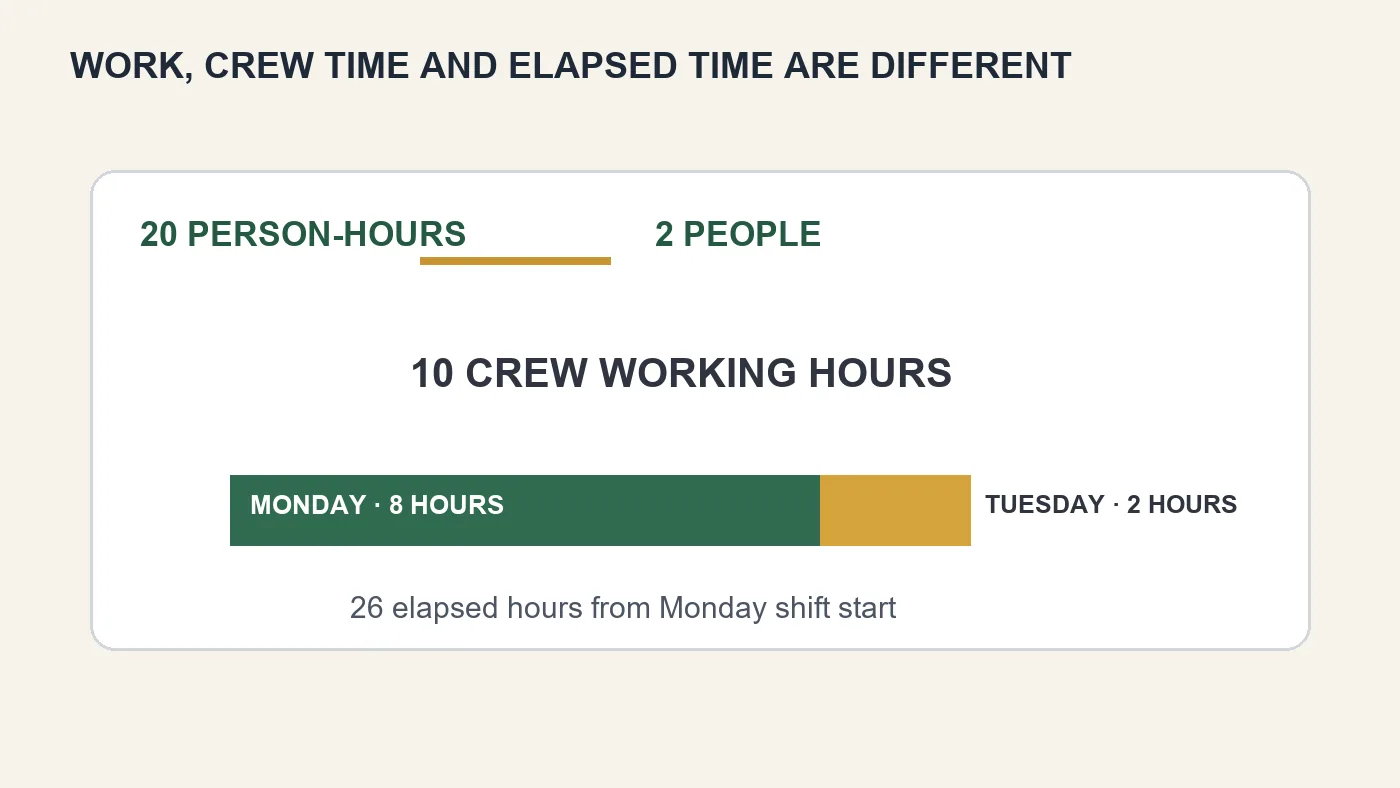
- Productive work: 100 ÷ 5 = 20 person-hours.
- Crew time: 20 ÷ 2 = 10 crew working hours.
- Monday supplies eight working hours, completing 80 units.
- The final two crew hours occur on Tuesday.
- The finish is Tuesday, two hours after the normal shift start: 26 elapsed hours from Monday’s start.
Enter 100 for quantity, 5 for units per person-hour, 2 people, 8 paid hours per day, Monday–Friday and Monday as Day 1. Leave all optional sections off. The live calculator should return 20 paid person-hours, 10 crew working hours and 26 elapsed hours.
Why a Friday start changes duration but not labor
Use the same job but choose Friday as Day 1 under a Monday–Friday calendar. The crew works eight hours Friday and the final two hours Monday. Paid labor remains 20 person-hours. Elapsed duration expands across the weekend. This is not “extra labor”; it is calendar time.
The same principle applies to curing, drying, inspection and delivery waits. A 24-hour wait means 24 elapsed hours in the calculator, not three eight-hour shifts. Confirm the actual product or process requirement and enter it separately. If somebody must actively monitor the wait, model that attendance as paid work.
Setup time belongs to the crew that performs it
One hour of setup with two people adds two person-hours and one crew working hour. If only one person unloads or masks the area, make it a one-person task instead of charging the whole production crew. This keeps the estimate honest and exposes opportunities to stagger arrivals.
Avoid including setup twice. If your recorded productivity already measures the whole task from arrival to completion, adding another setup allowance repeats it. Write down what the rate includes.
Sequential work, parallel work and dependencies
Tasks in the same phase can run together only when they have separate labor, access and equipment. Two jobs that both need the same room, lift or supervisor are not truly parallel. The calculator’s available-people check catches labor over-allocation, but it cannot know about shared machines or restricted access.
PMI’s scheduling guidance stresses that dependencies and resource allocation belong on the schedule. A finish-to-start relationship is appropriate when the successor genuinely cannot start until the predecessor completes. Do not place dependent work in the same phase merely to shorten the displayed finish.
Use the simple phase model for clear sequential blocks and genuine parallel branches. For complex networks in which one task can start partway through another, use a more detailed scheduling system and keep this calculator as the transparent labor check.
Build a productivity range, not one optimistic answer
Run a base case from credible production records, then test a slower case. If five units per person-hour is normal, compare four where access is awkward. One hundred units at four per person-hour needs 25 person-hours rather than 20. With two people that is 12.5 crew hours, moving more work into the second day.
This sensitivity check is more useful than adding a vague day “just in case.” It shows which assumption changed and lets you update the plan after the first measured shift. Record actual quantity completed and paid hours daily; the next estimate should use evidence from the last one.
Read the result without mixing cost and time
The person-hour total is the labor quantity. The crew schedule is the working pattern. The elapsed finish is the programme. Costs use paid person-hours plus entered extras. Nights, weekends and passive waits are not automatically paid. Likewise, reducing elapsed time through parallel work does not remove labor if the same total work is still performed.
For deeper scheduling context, see Microsoft’s explanation of work, duration, units and calendars and PMI’s guide to activities, dependencies and duration estimates.
Once the hours are checked, establish a sustainable rate with the hourly and day rate calculator, build the customer figure in the job price calculator, and compare equipment periods with the tool hire versus buy calculator.
A field-ready estimating routine
Before pricing, walk the work in the order it will actually happen. Photograph access, note the distance from unloading to the workface, check where materials can be stored and identify anything that restricts simultaneous work. Then write each task as a verb plus a measurable object: protect 600 square feet, remove 40 linear feet, fit 12 units. This makes omissions easier to spot than a single line called “complete job.”
For every task, record the quantity source, productivity source, crew, setup and dependency. Mark the confidence of the rate as high, medium or low. A rate measured on the same property type may be high confidence; a supplier example from ideal conditions is low confidence. Run the slower sensitivity case for low-confidence tasks and discuss the range before committing to a finish date.
What to check after the first shift
Do not wait until the end of the project to discover the rate was wrong. At the first natural checkpoint, record completed quantity, productive hours and crew size. Divide completed quantity by actual person-hours and compare the result with the estimate. If output is lower, first find the cause: unexpected preparation, interrupted access, unsuitable equipment or a rate that was simply too ambitious. Update the remaining quantity rather than rewriting work already completed.
A useful daily record is brief: people present, start and finish, measured output, delays and one sentence explaining any departure from the plan. Over several jobs this becomes a private productivity library. It is far more valuable than a generic rate book because it reflects your methods, customers and working conditions.
How to communicate the programme
Give the customer a duration together with its assumptions. Say, for example, “two people for Monday plus two hours Tuesday, assuming clear access and no additional substrate repairs.” Separate active working time from curing or inspection time, and identify decisions the customer must make before a dependent task starts. A schedule with visible conditions is easier to update fairly than a bare completion promise.
Frequently asked questions
What is a person-hour?
It is one person working for one hour. Two people working for three hours create six person-hours.
Is a person-hour the same as an elapsed hour?
No. Several people can work during one elapsed hour, while nights, weekends and waits can add elapsed time without paid work.
Does doubling the crew always halve the duration?
No. It does so only when work is divisible and output scales without congestion, shared-resource limits or extra coordination.
What productivity rate should I use?
Use records from comparable completed work, an assessed method or a reliable supplier/subcontractor basis. Keep the unit and included activities clear.
Should breaks be entered separately?
Enter paid working hours per day consistently with how the productivity rate was observed. The calculator schedules continuous daily work blocks and does not insert intra-day breaks.
How does setup affect paid hours?
Setup is whole-crew working time. One setup hour with a three-person crew adds three paid person-hours.
Does a cure time add labor cost?
Not automatically. Waiting adds elapsed time. Add a separate task when attendance or active work is required.
Can tasks in the same phase share workers?
No. Same-phase tasks are treated as parallel activities with separate crews. Put them in sequence if the same people must perform both.
Does the calculator include public holidays?
No. It uses a recurring working week and relative weekdays, not real dates or holidays.
When should I revise the estimate?
Update it when measured quantity, achieved output, crew availability, dependency or required wait changes. Retain the old version to improve future estimating.