
Gravel orders mix three different measurements: the area to cover, the volume needed at the specified depth, and the weight the supplier sells. Keep those stages separate and it becomes much easier to compare a bulk delivery with bags.
The gravel and aggregate calculator handles those conversions with editable density and allowances. This guide uses US feet, inches and short tons. Some tool labels also use UK terms such as “hardcore” and “MOT Type 1”; those names should not replace a US project material specification.
Identify the actual material and installed layer
“Gravel” can mean decorative rounded stone, angular crushed material, drainage stone or a graded base product. Similar-looking materials can serve different purposes. Settle the product and required installed depth before calculating the delivery.
Measure the footprint of that layer, including any designed extension beyond the finished surface. Do not assume a patio’s visible area describes all the supporting base. Split areas with different depths instead of applying one depth everywhere for convenience.
Washington Rock’s volume guide explains the length × width × depth approach and the need for consistent units. When depth is measured in inches, divide it by 12 before multiplying by dimensions in feet.
A worked 120-square-foot layer
Consider a 12-by-10-foot area with an entered installed depth of 4 inches. Its area is 120 square feet. The base volume is 120 × 4 ÷ 12 = 40 cubic feet, or about 1.481 cubic yards.
For this example, enter a hypothetical 20% compaction allowance, followed by 5% extra for handling and variation. These are hypothetical inputs to demonstrate the calculation, not recommended factors for every aggregate.
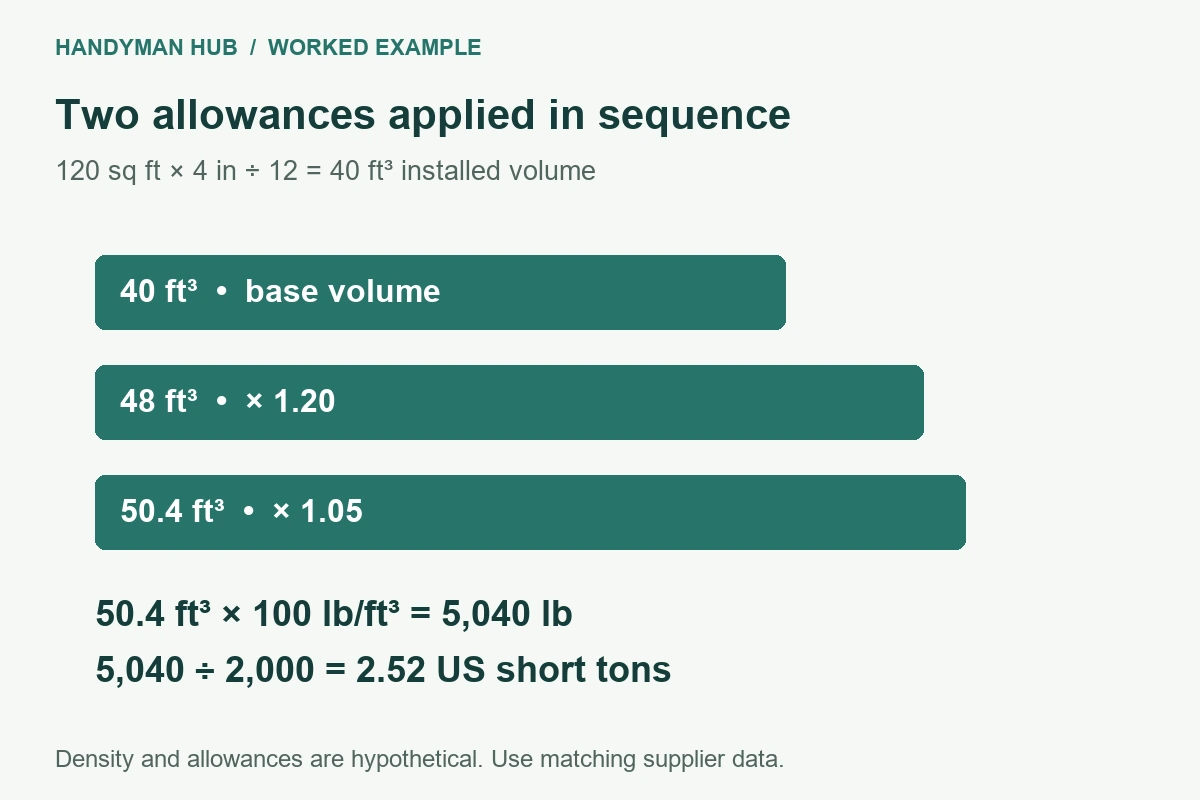
| Stage | Calculation | Volume |
|---|---|---|
| Installed geometry | 120 × 4 ÷ 12 | 40 ft³ |
| After 20% allowance | 40 × 1.20 | 48 ft³ |
| After another 5% | 48 × 1.05 | 50.4 ft³ |
The live calculator returns 50.4 cubic feet. That is 26% above the initial volume, because the allowances are applied successively: 1.20 × 1.05 = 1.26. Adding the percentages to get 25% would describe a different calculation.
A compaction allowance is not the same as shrinkage
“Add 20% to the installed volume” means multiply by 1.20. “The delivered volume reduces by 20%” means only 80% remains, so recovering a specified installed volume would require dividing by 0.80, equivalent to multiplying by 1.25.
Ask which definition a supplier or specification uses. The tool’s compaction field is an additive allowance applied to the base volume. Do not enter a shrinkage percentage as though the two definitions were interchangeable.
Likewise, do not add compaction again if a supplied coverage figure or quoted quantity already accounts for it. Write down whether a density or coverage refers to loose delivery material or installed material so the calculation stays on one consistent basis.
Convert volume to US tons using a stated density
Choose Custom Material and, for the worked example, enter a loose bulk density of 100 pounds per cubic foot. Multiplying 50.4 cubic feet by 100 gives 5,040 pounds. Divide by 2,000 to get 2.52 US short tons. Those are the checked live results.
The 100-pound density is an illustrative input, not a claim about your chosen stone. Use the supplier’s value for the actual product and condition. Moisture, grading and how the material is packed affect the relationship between volume and weight.
A metric tonne is 1,000 kilograms; a US short ton is 2,000 pounds. Confirm which unit appears on the quote. Selecting dollars changes the currency display, not the material density or an international exchange rate.
Compare bags and loose delivery on the same basis
A “bulk bag” has no universal weight or volume. Enter the actual package quantity and round up to whole bags only after the material requirement is established. If the product is sold by coverage at a particular depth, check that the stated depth matches your project.
For loose delivery, confirm minimum quantities, delivery charges and the permitted drop location. Washington Rock’s delivery information is an example of a supplier explaining minimum orders and pricing based on loaded weight. Its terms apply to its own service, not to every local yard.
Plan where the material can be placed without blocking the next stage of work. A lower per-ton price may be offset by extra handling or by a minimum order much larger than the job needs.
Keep removal and replacement quantities distinct
The excavation calculator estimates spoil leaving the site. Its bulking factor describes loosened ground, whereas the aggregate allowance here estimates a purchased layer. Reusing the same factor automatically can distort both quantities.
For a patio, the paving calculator can combine surface units with selected layers. Use this aggregate estimate as a cross-check if the same base is already included there. For a concrete project, keep the concrete volume separate from the supporting aggregate so one footprint does not turn into duplicate materials.
Related project planning
If the material is for a delivered pool, read the prefabricated pool planning guide before substituting any aggregate. Pool bedding and backfill must match the shell supplier’s requirements; a plausible density and accurate tonnage do not establish that a material is suitable.